Выложенные здесь алгоритмы преследуют исключительно учебные цели.
Код неоптимизирован, местами морально устарел и показывает только принцип решения той или иной задачи. Однако он вполне рабочий и может быть использован с соответствующей дорботкой под Ваши собственные нужды.
Буду рада, если не только я буду их пополнять)
Содержание:
Перевод из ... в ...
Сортировка массивов
Графика
Матрицы
Специальные функции
Методы поиска
Решение систем линейных уравнений
Решение нелинейных уравнений
Решение диф. уравнений
Будет еще дополнено.
Полная версия этой страницы: Коллекция алгоритмов
Градусы, минуты, секунды - в градусы:
Градусы - в градусы, минуты, секунды:
Комплексных величин - в экспоненциальную форму
Градусы по Фаренгейту - в градусы по Цельсию
Декартовы координаты - в полярные (2D)
Полярные - в декартовы
Декартовы координаты - в сферические (3D)
Сферические - в декартовы
» Кликните сюда для просмотра оффтоп текста.. «
Градусы - в градусы, минуты, секунды:
» Кликните сюда для просмотра оффтоп текста.. «
Комплексных величин - в экспоненциальную форму
» Кликните сюда для просмотра оффтоп текста.. «
Градусы по Фаренгейту - в градусы по Цельсию
» Кликните сюда для просмотра оффтоп текста.. «
Декартовы координаты - в полярные (2D)
» Кликните сюда для просмотра оффтоп текста.. «
Полярные - в декартовы
» Кликните сюда для просмотра оффтоп текста.. «
Декартовы координаты - в сферические (3D)
» Кликните сюда для просмотра оффтоп текста.. «
Сферические - в декартовы
» Кликните сюда для просмотра оффтоп текста.. «
Сортировка массивов
Binary insertions
Straight insertion
Heap sort
Straight selections
Shaker sort
Shell sort
Quick sort (recursive)
Quick sort (non-recursive)
Exchanges
Binary insertions
» Кликните сюда для просмотра оффтоп текста.. «
Straight insertion
» Кликните сюда для просмотра оффтоп текста.. «
Heap sort
» Кликните сюда для просмотра оффтоп текста.. «
Straight selections
» Кликните сюда для просмотра оффтоп текста.. «
Shaker sort
» Кликните сюда для просмотра оффтоп текста.. «
Shell sort
» Кликните сюда для просмотра оффтоп текста.. «
Quick sort (recursive)
» Кликните сюда для просмотра оффтоп текста.. «
Quick sort (non-recursive)
» Кликните сюда для просмотра оффтоп текста.. «
Exchanges
» Кликните сюда для просмотра оффтоп текста.. «
Графика
Фрактал (листья папоротника)
Рисование линии (по Брезенхэму)
Рисование окружности (по Брезенхэму)
Сглаживание кривой В-сплайном
Рисование куба
Рисование тора
Рисование 3D объекта
Вращение 3D объекта
Фрактал (листья папоротника)
» Кликните сюда для просмотра оффтоп текста.. «
Рисование линии (по Брезенхэму)
» Кликните сюда для просмотра оффтоп текста.. «
Рисование окружности (по Брезенхэму)
» Кликните сюда для просмотра оффтоп текста.. «
Сглаживание кривой В-сплайном
» Кликните сюда для просмотра оффтоп текста.. «
Рисование куба
» Кликните сюда для просмотра оффтоп текста.. «
Рисование тора
» Кликните сюда для просмотра оффтоп текста.. «
Рисование 3D объекта
» Кликните сюда для просмотра оффтоп текста.. «
Вращение 3D объекта
» Кликните сюда для просмотра оффтоп текста.. «
Матрицы:
Определитель
Обращение
Умножение
Транспонирование
Определитель
» Кликните сюда для просмотра оффтоп текста.. «
Обращение
» Кликните сюда для просмотра оффтоп текста.. «
Умножение
» Кликните сюда для просмотра оффтоп текста.. «
Транспонирование
» Кликните сюда для просмотра оффтоп текста.. «
Специальные функции:
arccos x (x - real)
arccos z (z - complex)
arcsin x
arcsin z
arctg x
arctg z
Функция Бесселя
Гамма-функция
Бета-функция
arccos x (x - real)
» Кликните сюда для просмотра оффтоп текста.. «
arccos z (z - complex)
» Кликните сюда для просмотра оффтоп текста.. «
arcsin x
» Кликните сюда для просмотра оффтоп текста.. «
arcsin z
» Кликните сюда для просмотра оффтоп текста.. «
arctg x
» Кликните сюда для просмотра оффтоп текста.. «
arctg z
» Кликните сюда для просмотра оффтоп текста.. «
Функция Бесселя
» Кликните сюда для просмотра оффтоп текста.. «
Гамма-функция
» Кликните сюда для просмотра оффтоп текста.. «
Бета-функция
» Кликните сюда для просмотра оффтоп текста.. «
Методы поиска
Binary search in sorted string
Substring search. Boyer-Moore algorithm
Linear substring search
Substring search. Knuth-Morris-Pratt algorithm
Linear search in the string
Binary search in sorted string
» Кликните сюда для просмотра оффтоп текста.. «
Substring search. Boyer-Moore algorithm
» Кликните сюда для просмотра оффтоп текста.. «
Linear substring search
» Кликните сюда для просмотра оффтоп текста.. «
Substring search. Knuth-Morris-Pratt algorithm
» Кликните сюда для просмотра оффтоп текста.. «
Linear search in the string
» Кликните сюда для просмотра оффтоп текста.. «
Решение систем линейных уравнений
Метод квадратного корня
Метод Некрасова
Метод 3-диагональных матриц
Метод Гаусса
Метод Гаусса с выбором максимального элемента
Метод итераций
Метод Монте-Карло
Метод ортогонализации
Метод Зэйделя
Метод квадратного корня
» Кликните сюда для просмотра оффтоп текста.. «
Метод Некрасова
» Кликните сюда для просмотра оффтоп текста.. «
Метод 3-диагональных матриц
» Кликните сюда для просмотра оффтоп текста.. «
Метод Гаусса
» Кликните сюда для просмотра оффтоп текста.. «
Метод Гаусса с выбором максимального элемента
» Кликните сюда для просмотра оффтоп текста.. «
Метод итераций
» Кликните сюда для просмотра оффтоп текста.. «
Метод Монте-Карло
» Кликните сюда для просмотра оффтоп текста.. «
Метод ортогонализации
» Кликните сюда для просмотра оффтоп текста.. «
Метод Зэйделя
» Кликните сюда для просмотра оффтоп текста.. «
Решение нелинейных уравнений
Метод хорд
Метод дихотомии
Метод Эйткена-Стеффенсона
Метод итераций
Метод Ньютона
Метод Лобачевского
Метод хорд
» Кликните сюда для просмотра оффтоп текста.. «
Метод дихотомии
» Кликните сюда для просмотра оффтоп текста.. «
Метод Эйткена-Стеффенсона
» Кликните сюда для просмотра оффтоп текста.. «
Метод итераций
» Кликните сюда для просмотра оффтоп текста.. «
Метод Ньютона
» Кликните сюда для просмотра оффтоп текста.. «
Метод Лобачевского
» Кликните сюда для просмотра оффтоп текста.. «
Решение дифференциальных уравнений
Метод Эйлера
Метод Адамса
Метод Эйлера-Коши
Метод Рунге-Кутта
Метод Эйлера
» Кликните сюда для просмотра оффтоп текста.. «
Метод Адамса
» Кликните сюда для просмотра оффтоп текста.. «
Метод Эйлера-Коши
» Кликните сюда для просмотра оффтоп текста.. «
Метод Рунге-Кутта
» Кликните сюда для просмотра оффтоп текста.. «
Алгоритм Дейкстры
Неплохой такой алгоритм, я его в дипломе использовала для 3D навигации по универу. Ищет кратчайший путь до заданного объекта от начальной точки.
Неформальное объяснение
Пример кода, который нашла
Мой пример (писала в Delphi)
Неплохой такой алгоритм, я его в дипломе использовала для 3D навигации по универу. Ищет кратчайший путь до заданного объекта от начальной точки.
Неформальное объяснение
» Кликните сюда для просмотра оффтоп текста.. «
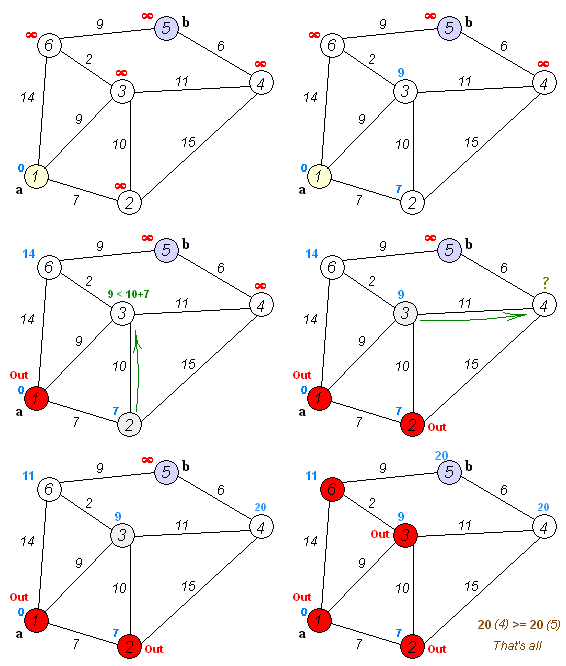

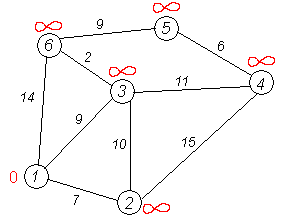

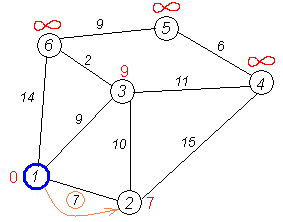

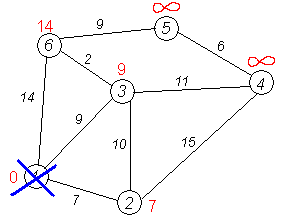
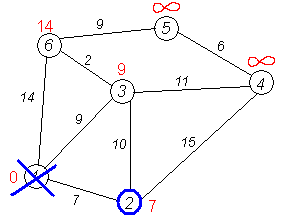


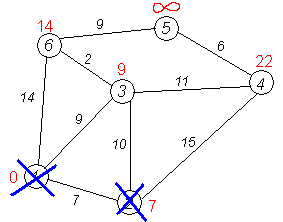


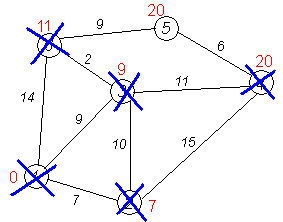

Пример кода, который нашла
» Кликните сюда для просмотра оффтоп текста.. «
Мой пример (писала в Delphi)
» Кликните сюда для просмотра оффтоп текста.. «
Волновой поиск
Поиск в глубину
Метод Хука-Дживса
» Кликните сюда для просмотра оффтоп текста.. «
Поиск в глубину
» Кликните сюда для просмотра оффтоп текста.. «
Метод Хука-Дживса
» Кликните сюда для просмотра оффтоп текста.. «
Про двумерную упаковку: offline алгоритмы
Сегодня, дорогой Читатель, я расскажу тебе историю о комбинаторной оптимизации.
Издревле (как минимум, с начала прошлого века) математики задавались вопросом, как оптимально разместить некоторое количествопива нужных и полезных предметов в рюкзаке. Была сформулирована задача о ранце и ее подзадачи — тысячи их! — которые заинтересовали информатиков, криптографов и даже лингвистов.
От задачи о ранце отпочковалась задача об упаковке в контейнеры (Bin Packing Problem), одной из разновидностей которых является задача двумерной упаковки (2-Dimensional Bin Packing). Снова отбросив несколько вариаций, мы наконец придем к двумерной упаковке в полуограниченную полосу (2-Dimensional Strip Packing, 2DSP). Чувствуете, сколько интересного уже осталось за кадром? Но мы еще не закончили продираться сквозь классификацию. У 2DSP есть два варианта входных данных: когда набор упаковываемых объектов известен заранее (offline-проблема) и когда данные поступают порциями (online-проблема).
В этой статье рассматриваются алгоритмы решения offline-варианта 2DSP. Под катом немного матчасти и много картинок с цветными квадратиками.
Как частный случай задачи двумерной упаковки, 2DSP заключается в упаковке объектов конкретной формы в конечное число контейнеров конкретной формы таким способом, чтобы число использованных контейнеров было наименьшим или количество или объем объектов (которые упаковывают) были наибольшими. Разница с двумерной упаковкой состоит в том, что есть только один контейнер, и вместо минимизации количества контейнеров, мы минимизируем высоту заполненности одного. Обеспечиваем максимальную плотность упаковки, если хотите.
Так как проблема NP-трудная, исследования сфокусированы главным образом на разработке приближенных алгоритмов решения. (На Хабре упоминался генетический алгоритм). Приближенные алгоритмы находят оптимальное решение с определенной точностью, но не гарантируют оптимальной упаковки для любого набора данных. При этом критерий оптимальности зависит от того, что вы пытались оптимизировать.
Я расскажу о простейших стратегиях и о том, к чему это все применимо в жизни (кроме рюкзака с пивом).
Итак, имеем набор из n прямоугольников и полуограниченный контейнер-стакан с фиксированной шириной W и бесконечной высотой. Каждый прямоугольник по ширине не превышает W. Задача — уложить прямоугольники в стакан без наложений и пересечений так, чтобы стакан стал как можно менее полон. Условимся, что все прямоугольники должны быть упакованы ортогонально, их нельзя поворачивать.
Видно, что задача имеет идеальное решение, при котором высота упакованных прямоугольников равна их суммарной площади деленной на ширину полосы.
Для offline варианта 2DSP сразу известен размер всех упаковываемых прямоугольников, поэтому их можно отсортировать, выбрать по определенному критерию, сгруппировать или просто натыкать в подходящие места. На этом и основываются большинство алгоритмов:
Плоские алгоритмы размещают прямоугольники строго вплотную друг к другу, но это не самая удачная стратегия, как может показаться на первый взгляд. Уровневые делят полосу на уровни, равные по высоте одному из выбранных прямоугольников, и помещают все остальные на конкретный уровень по определенному критерию. Шельфовые предопределяют сразу несколько шельфов (полок), и распихивают по ним прямоугольники, такое поведение характерно для online-алгоритмов, а это уже совсем другая история.
Чем распространяться на общие слова, лучше обо всем по порядку.
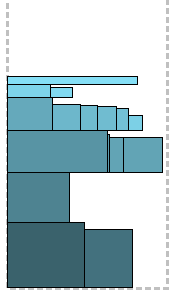
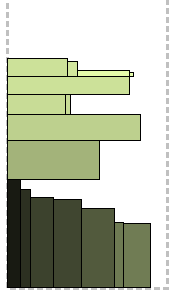
Алгоритм, что называется, «в лоб». Прямоугольники сортируются по не-возрастанию высоты (Decreasing High намекает), самый высокий располагается в левом нижнем углу полосы, тем самым инициализируя первый уровень, по высоте равный ему. Остальные прямоугольники располагаются слева направо, пока есть место на текущем уровне. Прямоугольник, который не поместился на уровне, помещается сверху, образуя следующий уровень, и так далее.
Иллюстрации для каждого алгоритма будут производиться для следующих двух примеров: для наглядности, в левом форма прямоугольников тяготеет к вытянутой, в правом — более квадратные.
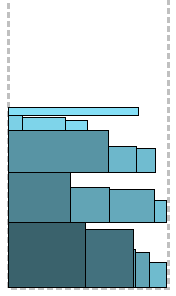
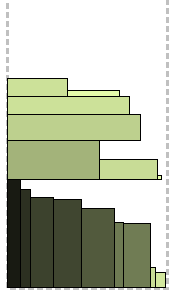
Похожий на предыдущий алгоритм, с той разницей, что для каждого следующего прямоугольника ищется место не только на последнем уровне, а начиная с самого нижнего. Отсюда и «first fit» — прямоугольник помещается на первый подходящий уровень снизу. Интуитивно понятно, что упаковка будет качественнее. Еще одно значительное отличие — в производительности, так как в худшем случае придется рассматривать на каждом шагу все уровни снизу вверх.

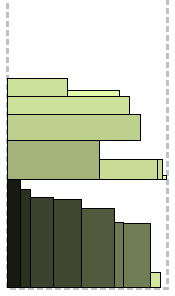
Модификация предыдущего алгоритма. Суть ее в том, что из уровней, подходящих для упаковки очередного прямоугольника, выбирается не первый, а лучший. Лучший уровень — это такой, на котором останется минимум места после упаковки текущего прямоугольника. Проще говоря, выбирается минимальное подходящее пространство, что способствует лучшему заполнению уровней.

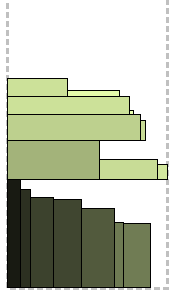
Здесь стоит остановиться подробнее. Knapsack 0-1 — это частный случай задачи о ранце; примечателен тем, что кроме ответа на основной вопрос (нет, не 42, а полученный объем упаковки) дает еще и решение — список предметов, которые нужно упаковать. Порядок действий таков: прямоугольники сортируются по не-возрастанию высоты; упаковывается первый прямоугольник на новый уровень; для этого уровня находится решение задачи Knapsack 0-1, которое дает нам список прямоугольников, максимизированный по площади. Выбранные прямоугольники пакуются и извлекаются из списка неупакованных, уровень закрывается и открывается новый — инициализированный, как водится, первым (самым высоким) из оставшихся. Повторить, пока есть прямоугольники.
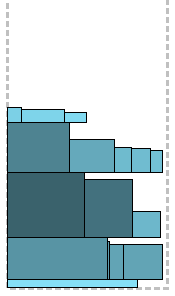

Алгоритм, призванный улучшить FFDN по принципу «разделяй и властвуй». Для начала отбираются прямоугольники, которые шире чем половина полосы. Они будут упакованы в первую очередь. Из них выбираются еще более широкие — шире, чем 2/3 полосы; они упаковываются алгоритмом FFDH. Над ними, начиная со следующего уровня (назовем его уровень R), упаковываются оставшиеся, те, что все еще шире 1/2, но уже 2/3. Они тоже упаковываются с помощью FFDH. Это разделение создает свободный регион шириной 1/3 справа от только что упакованных, начинающийся на уровне R и заканчивающийся текущей верхней границей упаковки (то есть он не простирается выше прямоугольников 1/2 < width <= 2/3). Все оставшиеся прямоугольники, которые уже, чем 1/2 полосы, упаковываются с помощью того же FFDH в первую очередь в образовавшийся регион, а если не помещаются — то сверху. На словах звучит громоздко, на картинке должно быть понятнее. А для тех, кто уже устал от моих литературных упражнений — псевдокод:

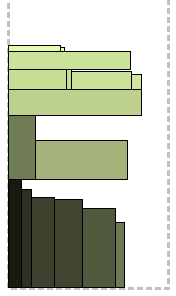
Судя по всему, этот алгоритм был заточен под определенного характера входные данные, что ж, любая практическая ситуация имеет право на существование. Сейчас сами все поймете. Отсортированные, как водится, по не-возрастанию высоты прямоугольники объединяются в пары так, чтобы разница высоты в паре не превышала заданной доли, обычно 0-10%. Еще одно условие — чтобы их суммарная ширина помещалась в полосу. Полученные «супер-прямоугольники» упаковываются вместе с оставшимися без пары с помощью NFDH и FFDH, выбирается лучшее решение.
Существует вариация этого алгоритма, когда прямоугольники сортируются по ширине и объединяются вертикально, с тем же условием максимального отклонения ширины в паре на заданное количество процентов.
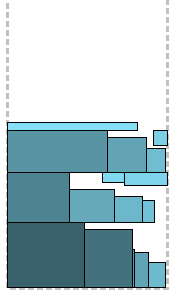
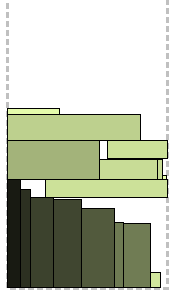
Если вы все еще недоумеваете по поводу остающегося на уровнях пространства, то этот алгоритм для вас. Прямоугольники сортируются по не-возрастанию высоты (неожиданно, да?) и применяется алгоритм BFDH с некоторыми модификациями. У каждого уровня есть «пол» (floor) и «потолок» (ceiling). Пока есть возможность, прямоугольники пакуются на «пол» слева направо. Когда место заканчивается, предпринимается попытка упаковать на «потолок» справа налево; если нет места на потолке, то только тогда начинается новый уровень. В лучших традициях BFDH, на каждом шагу просматриваются все уровни — сначала «пол», затем «потолок» — на наличие наиболее подходящего места. Упаковка, как видите, неплохая. Метод удачно упаковывает по «потолкам» самые мелкие прямоугольники.
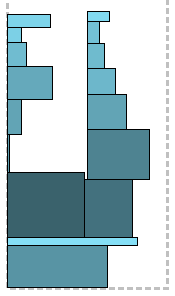
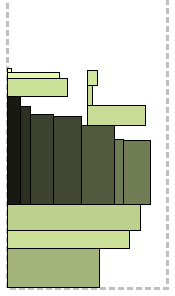
Настало время «плоских» алгоритмов, без деления на уровни. Алгоритм Sleator использует интуитивный принцип упаковки рюкзака: сложить на дно самые крупные предметы и засыпать сверху мелкими. Вот как это выглядит. Из прямоугольников выбираются самые широкие, шире половины полосы, как вы уже догадались, и хаотично укладываются друг на друга с выравниванием по левому краю. Оставшиеся сортируются по не-возрастанию высоты и начинают укладываться друг за другом слева направо сверху на уже уложенные. Как только их суммарная ширина превысит половину ширины полосы, оставшиеся раскидываются друг на друга то слева (начиная от левого края полосы), то справа (от середины), по принципу «где на данный момент меньше». Как видно из рисунков, этим методом удобнее укладывать книги, чем коробки.

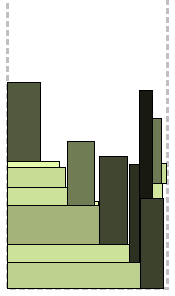
Снова безуровневый алгоритм, для которого вводится дополнительная «карта высот»:
Это массив, по которому по мере заполнения полосы можно отслеживать наименее заполненные области и их ширину. В начале он заполнен нулями. Прямоугольники сортируются по не-возрастанию, внезапно, ширины. Затем, на каждом шаге алгоритма:
1. Вычисляется позиция самой низкой области — индекс минимального значения массива;
2. Выбирается наиболее подходящий прямоугольник — во-первых, помещающийся в эту область, во-вторых, максимально ее заполняющий по ширине;
3. Если подходящий прямоугольник найден, он размещается в этой области одним из способов:
3.1 По левому краю области;
3.2 Ближе к более высокому соседу, если один из соседей — край полосы, то ближе к краю;
3.3 Ближе к менее высокому соседу, если один из соседей — край полосы, то дальше от края. К значениям массива, соответствующим ширине прямоугольника, прибавляется его высота.
4. Если подходящего прямоугольника нет, область «заполняется» путем выравнивания ее высоты до высоты ближайшего края.
Вам уже захотелось написать по этому алгоритму бота, играющего в Тетрис?
Результат работы каждого алгоритма — это уровень заполненности полосы, чем меньше, тем лучше. Его можно оценить отношением к нему оптимального:
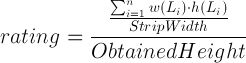
Сравним полученные результаты для двух приведенных наборов исходных данных:
Видим, что для обоих наборов данных победил алгоритм Floor Ceiling. Можно отметить, что Sleator показал гораздо лучший результат для первого набора, а Join, наоборот, больше подходит для второго. Но все это не более, чем статистика.
За счет своей простой формулировки, задача бинарной упаковки может быть подтянута к огромному количеству практических применений: непосредственно к упаковке объектов или раскройке материала, распределению средств, планировке задач на кластерах, etc. В жизни мало рафинированных задач, но, ограничив некоторые условия, можно свести ситуацию к красивой математической модели, имеющей неплохое решение, достижимое за полиномиальное время. А однажды, в результате эффекта бабочки, отброшенные условия возымеют большой вес и решение полетит ко всем Безымянным. Вот из-за таких допущений и несовершенен мир.
Что-то я отвлеклась. В следующей части надеюсь рассказать об online-версии задачи и шельфовых алгоритмах. Good luck!
Источники вдохновения:
Nthabiseng Ntene An Algorithmic Approach to the 2D Oriented Strip Packing Problem
David Pisinger Knapsack problem
Survey on two-dimensional packing
Level Algorithms and Shelf Algorithms (осторожно, дизайн-вырви-глаз)
Код (Qt):
Алгоритмы packager.h packager.cpp
Гуй window.h window.cpp renderarea.h renderarea.cpp main.cpp
Издревле (как минимум, с начала прошлого века) математики задавались вопросом, как оптимально разместить некоторое количество
От задачи о ранце отпочковалась задача об упаковке в контейнеры (Bin Packing Problem), одной из разновидностей которых является задача двумерной упаковки (2-Dimensional Bin Packing). Снова отбросив несколько вариаций, мы наконец придем к двумерной упаковке в полуограниченную полосу (2-Dimensional Strip Packing, 2DSP). Чувствуете, сколько интересного уже осталось за кадром? Но мы еще не закончили продираться сквозь классификацию. У 2DSP есть два варианта входных данных: когда набор упаковываемых объектов известен заранее (offline-проблема) и когда данные поступают порциями (online-проблема).
В этой статье рассматриваются алгоритмы решения offline-варианта 2DSP. Под катом немного матчасти и много картинок с цветными квадратиками.
В чем, собственно, проблема?
Как частный случай задачи двумерной упаковки, 2DSP заключается в упаковке объектов конкретной формы в конечное число контейнеров конкретной формы таким способом, чтобы число использованных контейнеров было наименьшим или количество или объем объектов (которые упаковывают) были наибольшими. Разница с двумерной упаковкой состоит в том, что есть только один контейнер, и вместо минимизации количества контейнеров, мы минимизируем высоту заполненности одного. Обеспечиваем максимальную плотность упаковки, если хотите.
Так как проблема NP-трудная, исследования сфокусированы главным образом на разработке приближенных алгоритмов решения. (На Хабре упоминался генетический алгоритм). Приближенные алгоритмы находят оптимальное решение с определенной точностью, но не гарантируют оптимальной упаковки для любого набора данных. При этом критерий оптимальности зависит от того, что вы пытались оптимизировать.
Я расскажу о простейших стратегиях и о том, к чему это все применимо в жизни (кроме рюкзака с пивом).
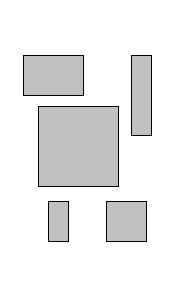
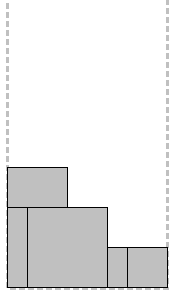
Итак, имеем набор из n прямоугольников и полуограниченный контейнер-стакан с фиксированной шириной W и бесконечной высотой. Каждый прямоугольник по ширине не превышает W. Задача — уложить прямоугольники в стакан без наложений и пересечений так, чтобы стакан стал как можно менее полон. Условимся, что все прямоугольники должны быть упакованы ортогонально, их нельзя поворачивать.
 |
 |
 |
 |
| Исходные данные (начало XX века, кубизм) |
Полуограниченная полоса | Вариант упаковки (похуже) | Вариант упаковки (получше) |
Видно, что задача имеет идеальное решение, при котором высота упакованных прямоугольников равна их суммарной площади деленной на ширину полосы.
Зоопарк алгоритмов
Для offline варианта 2DSP сразу известен размер всех упаковываемых прямоугольников, поэтому их можно отсортировать, выбрать по определенному критерию, сгруппировать или просто натыкать в подходящие места. На этом и основываются большинство алгоритмов:
- уровневые (level)
- шельфовые (shelf)
- плоские (plane)
Плоские алгоритмы размещают прямоугольники строго вплотную друг к другу, но это не самая удачная стратегия, как может показаться на первый взгляд. Уровневые делят полосу на уровни, равные по высоте одному из выбранных прямоугольников, и помещают все остальные на конкретный уровень по определенному критерию. Шельфовые предопределяют сразу несколько шельфов (полок), и распихивают по ним прямоугольники, такое поведение характерно для online-алгоритмов, а это уже совсем другая история.
Чем распространяться на общие слова, лучше обо всем по порядку.
Next Fit Decreasing High
Алгоритм, что называется, «в лоб». Прямоугольники сортируются по не-возрастанию высоты (Decreasing High намекает), самый высокий располагается в левом нижнем углу полосы, тем самым инициализируя первый уровень, по высоте равный ему. Остальные прямоугольники располагаются слева направо, пока есть место на текущем уровне. Прямоугольник, который не поместился на уровне, помещается сверху, образуя следующий уровень, и так далее.
Иллюстрации для каждого алгоритма будут производиться для следующих двух примеров: для наглядности, в левом форма прямоугольников тяготеет к вытянутой, в правом — более квадратные.
Алгоритм NFDH
Input: The number of rectangles to be packed n,
       the dimensions of the rectangles
       {w(Li); h(Li)} and the strip width W.
Output: The height of a packing obtained in the strip.
 1: level = 0; h(level) = 0; w(level) = 0; i = 1
 2: Sort the rectangles in order of non-increasing height such that h(L1) ≥ h(L2) ≥ ... ≥ h(Ln)
 3: Pack rectangle Li left-justifed at the bottom of the strip
 4: h(level) = h(Li); w(level) = w(Li)
 5: for i = 2..n do
 6:   if W - w(level) ≥ w(Li) then
 7:     pack rectangle Li to the right of rectangle Li-1
 8:     w(level) += w(Li)
 9:   else [W - w(level) < w(Li)]
10:     create a new level above the previous one and pack rectangle Li on the new level
11:     level++; w(level) = w(Li); h(level) = h(level-1) + h(Li)
12:   end if
13: end for
14: print H = h(level)
First Fit Decreasing High
Похожий на предыдущий алгоритм, с той разницей, что для каждого следующего прямоугольника ищется место не только на последнем уровне, а начиная с самого нижнего. Отсюда и «first fit» — прямоугольник помещается на первый подходящий уровень снизу. Интуитивно понятно, что упаковка будет качественнее. Еще одно значительное отличие — в производительности, так как в худшем случае придется рассматривать на каждом шагу все уровни снизу вверх.
Алгоритм FFDH
Input: The number of rectangles to be packed n,
       the dimensions of the rectangles
       {w(Li); h(Li)} and the strip width W.
Output: The height of a packing obtained in the strip.
 1: level = 0; h(level) = 0; i = 1; LevelNum = 1
 2: Sort the rectangles in order of non-increasing height such that h(L1) ≥ h(L2) ≥ ... ≥ h(Ln)
 3: Pack rectangle Li left-justifed at the bottom of the strip; h(level+1) = h(Li)
 4: for i = 2..n do
 5:   search all levels (from the bottom) for the lowest with sufficient space
 6:   if such a level exist then
 7:     pack rectangle Li left justified on that level
 8:   else [there is insufficient space in all existing levels]
 9:     LevelNum++; level = LevelNum; h(level) = h(level-1) + h(Li)
10:     pack rectangle Li on the new level
11:   end if
12: end for
13: print H = h(level)
Best Fit Decreasing High
Модификация предыдущего алгоритма. Суть ее в том, что из уровней, подходящих для упаковки очередного прямоугольника, выбирается не первый, а лучший. Лучший уровень — это такой, на котором останется минимум места после упаковки текущего прямоугольника. Проще говоря, выбирается минимальное подходящее пространство, что способствует лучшему заполнению уровней.
Алгоритм BFDH
Input: The number of rectangles to be packed n,
       the dimensions of the rectangles
       {w(Li); h(Li)} and the strip width W.
Output: The height of a packing obtained in the strip.
 1: level = 0; h(level) = 0; i = 1; LevelNum = 1
 2: Sort the rectangles in order of non-increasing height such that h(L1) ≥ h(L2) ≥ ... ≥ h(Ln)
 3: Pack rectangle Li left-justifed at the bottom of the strip; h(level+1) = h(Li)
 4: for i = 2..n do
 5:   search all levels for the level with sufficient space and has minimum residual space
 6:   if such a level exist then
 7:     pack rectangle Li left justified on that level
 8:   else [there is insufficient space in all existing levels]
 9:     create a new level above the top-most level and pack rectangle Li
10:     LevelNum++; level = LevelNum; h(level) = h(level-1) + h(Li)
11:   end if
12: end for
13: print H = h(level)
Knapsack 0-1
Здесь стоит остановиться подробнее. Knapsack 0-1 — это частный случай задачи о ранце; примечателен тем, что кроме ответа на основной вопрос (нет, не 42, а полученный объем упаковки) дает еще и решение — список предметов, которые нужно упаковать. Порядок действий таков: прямоугольники сортируются по не-возрастанию высоты; упаковывается первый прямоугольник на новый уровень; для этого уровня находится решение задачи Knapsack 0-1, которое дает нам список прямоугольников, максимизированный по площади. Выбранные прямоугольники пакуются и извлекаются из списка неупакованных, уровень закрывается и открывается новый — инициализированный, как водится, первым (самым высоким) из оставшихся. Повторить, пока есть прямоугольники.
Алгоритм KP01
Input: The number of rectangles to be packed n,
       the dimensions of the rectangles
       {w(Li); h(Li)} and the strip width W.
Output: The height of a packing obtained in the strip.
 1: Sort the rectangles in order of non-increasing height such that h(L1) ≥ h(L2) ≥ ... ≥ h(Ln)
 2: level = 0
 3: while there are unpacked rectangles do
 4:   pack first unpacked rectangle, Li say
 5:   h(level) += h(Li)
 6:   solve KP01 instance
 7:   pack selected rectangles
 8:   level = level + 1
 9: end while
10: print H = h(level)
Split Fit
Алгоритм, призванный улучшить FFDN по принципу «разделяй и властвуй». Для начала отбираются прямоугольники, которые шире чем половина полосы. Они будут упакованы в первую очередь. Из них выбираются еще более широкие — шире, чем 2/3 полосы; они упаковываются алгоритмом FFDH. Над ними, начиная со следующего уровня (назовем его уровень R), упаковываются оставшиеся, те, что все еще шире 1/2, но уже 2/3. Они тоже упаковываются с помощью FFDH. Это разделение создает свободный регион шириной 1/3 справа от только что упакованных, начинающийся на уровне R и заканчивающийся текущей верхней границей упаковки (то есть он не простирается выше прямоугольников 1/2 < width <= 2/3). Все оставшиеся прямоугольники, которые уже, чем 1/2 полосы, упаковываются с помощью того же FFDH в первую очередь в образовавшийся регион, а если не помещаются — то сверху. На словах звучит громоздко, на картинке должно быть понятнее. А для тех, кто уже устал от моих литературных упражнений — псевдокод:
Алгоритм SF
Input: The number of rectangles to be packed n,
       the dimensions of the rectangles
       {w(Li); h(Li)} and the strip width W.
Output: The height of a packing obtained in the strip.
1: Let m ≥ 1 be the largest integer for which all rectangles in L
   have width at most 1=m
2: Partition the list of rectangles L into two sublists L1 and L2
   such that L1 is a list of rectangles of width greater than
   1/(m+1), while L2 is a list of rectangles of width at most 1/(m+1)
3: Pack the L1 rectangles into the strip, using the FFDH algorithm
4: Rearrange the blocks of this packing such that those of width
   greater than (m+1)/(m+2) are below those of width
   at most (m+1)/(m+2)
5: Pack rectangles of width at most 1/(m+2) into the region R
   using FFDH algorithm such that no rectangle overlaps the top
   of R and those failing to fit in R are packed above the packing of L1
6: Output the height of the strip, found by adding the height of each level
Join
Судя по всему, этот алгоритм был заточен под определенного характера входные данные, что ж, любая практическая ситуация имеет право на существование. Сейчас сами все поймете. Отсортированные, как водится, по не-возрастанию высоты прямоугольники объединяются в пары так, чтобы разница высоты в паре не превышала заданной доли, обычно 0-10%. Еще одно условие — чтобы их суммарная ширина помещалась в полосу. Полученные «супер-прямоугольники» упаковываются вместе с оставшимися без пары с помощью NFDH и FFDH, выбирается лучшее решение.
Существует вариация этого алгоритма, когда прямоугольники сортируются по ширине и объединяются вертикально, с тем же условием максимального отклонения ширины в паре на заданное количество процентов.
Алгоритм Join
Input: The number of rectangles to be packed n,
       the dimensions of the rectangles
       {w(Li); h(Li)}, the constant gamma as a
       percentage and the strip width W.
Output: The height of a packing obtained in the strip.
 1: Sort the rectangles in order of non-increasing height such that h(L1) ≥ h(L2) ≥ ... ≥ h(Ln)
 2: j = 1
 3: while j+1 ≤ n do
 4:   if (h(Lj) - h(Lj+1))/h(Lj) * 100 < gamma
         and w(Lj) + w(Lj+1) ≤ W then
 5:     w(Lj) += w(Lj+1)
 6:     j += 2
 7:   else
 8:     j++
 9:   end if
10: end while
11: Execute the NFDH and FFDH algorithms to pack the rectangles
12: From the best solution, construct a feasible packing of the original instance
13: Output the height of the strip, found by adding the height of each level
Floor Сeiling No Rotation
Если вы все еще недоумеваете по поводу остающегося на уровнях пространства, то этот алгоритм для вас. Прямоугольники сортируются по не-возрастанию высоты (неожиданно, да?) и применяется алгоритм BFDH с некоторыми модификациями. У каждого уровня есть «пол» (floor) и «потолок» (ceiling). Пока есть возможность, прямоугольники пакуются на «пол» слева направо. Когда место заканчивается, предпринимается попытка упаковать на «потолок» справа налево; если нет места на потолке, то только тогда начинается новый уровень. В лучших традициях BFDH, на каждом шагу просматриваются все уровни — сначала «пол», затем «потолок» — на наличие наиболее подходящего места. Упаковка, как видите, неплохая. Метод удачно упаковывает по «потолкам» самые мелкие прямоугольники.
Алгоритм FCNR
Input: The number of rectangles to be packed n,
       the dimensions of the rectangles
       {w(Li); h(Li)} and the strip width W.
Output: The height of a packing obtained in the strip.
 1: Sort the rectangles in order of non-increasing height such that h(L1) ≥ h(L2) ≥ ... ≥ h(Ln)
 2: for i = 1..n do
 3:   if Li is ceiling feasible then
 4:     pack Li on ceiling with minimum residual space
 5:   else [Li is not ceiling feasible]
 6:     if Li is floor feasible then
 7:       pack Li on the floor with minimum residual space
 8:     else [Li is not floor feasible]
 9:       level++;
10:     end if
11:   end if
12: end for
13: Output the height H of the strip, found by adding the height of each level
Sleator
Настало время «плоских» алгоритмов, без деления на уровни. Алгоритм Sleator использует интуитивный принцип упаковки рюкзака: сложить на дно самые крупные предметы и засыпать сверху мелкими. Вот как это выглядит. Из прямоугольников выбираются самые широкие, шире половины полосы, как вы уже догадались, и хаотично укладываются друг на друга с выравниванием по левому краю. Оставшиеся сортируются по не-возрастанию высоты и начинают укладываться друг за другом слева направо сверху на уже уложенные. Как только их суммарная ширина превысит половину ширины полосы, оставшиеся раскидываются друг на друга то слева (начиная от левого края полосы), то справа (от середины), по принципу «где на данный момент меньше». Как видно из рисунков, этим методом удобнее укладывать книги, чем коробки.
Алгоритм Sleator
Input: The number of rectangles to be packed n,
       the dimensions of the rectangles
       {w(Li); h(Li)} and the strip width W.
Output: The height of a packing obtained in the strip.
 1: Partition L into two sublists L1 and L2 consisting of rectangles
    of width greater than 1/2 and at most 1/2 respectively.
 2: Stack all the rectangles in L1 left justified on top of
    one another starting at the bottom of the strip. Compute Hstack
 3: Packing will continue above Hstack
 4: Sort the rectangles in L2 according to non-increasing height
    such that h(Li) ≥ h(Li+1) for i < n
 5: Let Htall be the height of the tallest rectangle in list L2.
 6: Pack the rectangles, left justified from the left to the right
    edge of the strip until there is insufficient space to pack
    a rectangle or all of the rectangles have been packed
 7: Partition the strip with a vertical line into two equal segments.
    There is possibly one rectangle whose interior may be intercepted
    by the vertical line.
 8: Let Hright and Hleft be the height of the rectangle on the right
    (resp. left) half of the strip whose left (resp. right) edge
    is adjacent to the vertical line or whose interior is intercepted
    by the vertical line
 9: while there are unpacked rectangles do
10:   Draw horizontal lines of length half across
      the rectangles whose height is Hleft and Hright
11:   All subsequent packing will either be on the left
      or right segment of the strip
12:   Select the segment with minimum height and pack
      rectangles from the edge of the strip to the
      vertical line until all rectangles have been
      packed or there is a rectangles which does not fit
13: end while
14: print H = max{Hleft; Hright}
Burke
Снова безуровневый алгоритм, для которого вводится дополнительная «карта высот»:
|               |    |    _   _   ___|
|               |    |   | |_|_| |   |
|               |    |_  | |   | |   |
|_ _ _ _ _ _ _ _| .. |_|_|_|_ _|_|_ _|
 0 0 0 0 0 0 0 0      1 0 3 2 3 0 3 3
Это массив, по которому по мере заполнения полосы можно отслеживать наименее заполненные области и их ширину. В начале он заполнен нулями. Прямоугольники сортируются по не-возрастанию, внезапно, ширины. Затем, на каждом шаге алгоритма:
1. Вычисляется позиция самой низкой области — индекс минимального значения массива;
2. Выбирается наиболее подходящий прямоугольник — во-первых, помещающийся в эту область, во-вторых, максимально ее заполняющий по ширине;
3. Если подходящий прямоугольник найден, он размещается в этой области одним из способов:
3.1 По левому краю области;
3.2 Ближе к более высокому соседу, если один из соседей — край полосы, то ближе к краю;
3.3 Ближе к менее высокому соседу, если один из соседей — край полосы, то дальше от края. К значениям массива, соответствующим ширине прямоугольника, прибавляется его высота.
4. Если подходящего прямоугольника нет, область «заполняется» путем выравнивания ее высоты до высоты ближайшего края.
Вам уже захотелось написать по этому алгоритму бота, играющего в Тетрис?
Алгоритм Burke
Input: The number of rectangles to be packed n,
       the dimensions of the rectangles
       {w(Li); h(Li)} and the strip width W.
Output: The height of a packing obtained in the strip.
 1: Sort the rectangles according to non-increasing width such that w(Li) ≥ w(Li+1) ≥ .. ≥ W(Ln)
 2: for each placement policy
    (leftmost, tallest neighbour, smallest neighbour) do
 3:   while Rectangles not packed do
 4:     find lowest gap
 5:     if w(Li) ≤ GapWidth then
 6:       place best fitting rectangle using placement policy
 7:       raise elements of array to appropriate height
 8:     else
 9:       raise gap to height of the lowest neighbour
10:     end if
11:   end while
12: end for
13: The elements of the array with greatest entry give the total height of the packing
14: Compare total packing heights obtained by each placement policy and return the best solution
Кто лучше?
Результат работы каждого алгоритма — это уровень заполненности полосы, чем меньше, тем лучше. Его можно оценить отношением к нему оптимального:
Сравним полученные результаты для двух приведенных наборов исходных данных:
| Оптимальное решение |
NFDH | FFDH | BFDH | KP01 | SF | JOIN | FCNR | Sleator | Bruke | |
|---|---|---|---|---|---|---|---|---|---|---|
| Набор 1 | 149 | 0,65 | 0,71 | 0,71 | 0,71 | 0,75 | 0,61 | 0,83 | 0,68 | 0,72 |
| Набор 2 | 140 | 0,66 | 0,77 | 0,77 | 0,78 | 0,77 | 0,70 | 0,84 | 0,51 | 0,71 |
Видим, что для обоих наборов данных победил алгоритм Floor Ceiling. Можно отметить, что Sleator показал гораздо лучший результат для первого набора, а Join, наоборот, больше подходит для второго. Но все это не более, чем статистика.
Эпилог
За счет своей простой формулировки, задача бинарной упаковки может быть подтянута к огромному количеству практических применений: непосредственно к упаковке объектов или раскройке материала, распределению средств, планировке задач на кластерах, etc. В жизни мало рафинированных задач, но, ограничив некоторые условия, можно свести ситуацию к красивой математической модели, имеющей неплохое решение, достижимое за полиномиальное время. А однажды, в результате эффекта бабочки, отброшенные условия возымеют большой вес и решение полетит ко всем Безымянным. Вот из-за таких допущений и несовершенен мир.
Что-то я отвлеклась. В следующей части надеюсь рассказать об online-версии задачи и шельфовых алгоритмах. Good luck!
Источники вдохновения:
Nthabiseng Ntene An Algorithmic Approach to the 2D Oriented Strip Packing Problem
David Pisinger Knapsack problem
Survey on two-dimensional packing
Level Algorithms and Shelf Algorithms (осторожно, дизайн-вырви-глаз)
Код (Qt):
Алгоритмы packager.h packager.cpp
Гуй window.h window.cpp renderarea.h renderarea.cpp main.cpp
Про двумерную упаковку: online алгоритмы
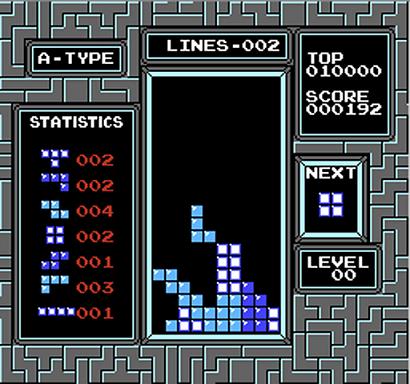 Это продолжение поста про оффлайн алгоритмы упаковки.
Суть задачи: имеем полубесконечную полосу — как в тетрисе, только без game over'а, и конечный набор прямоугольников. Данные о прямоугольниках поступают в режиме реального времени; каждый новый прямоугольник необходимо немедленно разместить и больше не двигать с места. Цель — минимизировать общую высоту упакованных прямоугольников.
Это online-вариация задачи об упаковке прямоугольников в полуограниченную полосу (2 Dimensional Strip Packing, 2DSP).
Чуть больше теоретических сведений можно найти в предыдущей статье, а пока, без лишних слов, перейдем к алгоритмам.
Для иллюстрации будет использоваться вот такая последовательность кирпичей:

(Спонсор исходных данных — random.org).
Будут описаны некоторые эвристические алгоритмы, общая идея которых состоит в том, чтобы предварительно разделить полосу на области, и размещать вновь поступающие прямоугольники в конкретной области по определенным критериям.
Level algorithms
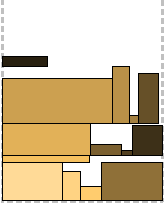
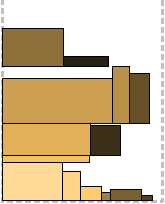

Подход всех уровневых алгоритмов в том, что полоса разделяется на уровни, исходя из высоты имеющихся на данном этапе прямоугольников. Прямоугольники размещаются вдоль основания текущего уровня слева направо, пока это возможно; прямоугольник, который не поместился, упаковывается на следующий уровень. Высота каждого уровня определяется по самому высокому прямоугольнику в нем. Вот три варианта упаковки:
Next Fit Level — когда открывается следующий уровень, предыдущий «закрывается» и его больше не рассматриваем;
First Fit Level — на каждом шагу алгоритма просматривается каждый уровень, начиная с самого нижнего, и прямоугольник упаковывается на первый подходящий, на котором достаточно места;
Best Fit Level — на каждом шагу алгоритма просматриваются все уровни, и выбирается наиболее подходящий — тот, на котором после упаковки останется минимум места.
Все три алгоритма проиллюстрированы выше. На этом этапе несложно догадаться, какой где.
Алгоритмы NFL, FFL, BFL
Next Fit Level
Input: The dimensions of the rectangles {w(Li); h(Li)} and the strip width W.
Output: The height H and the entire packing.
 1: level = 0; h(level + 1) = 0; H = 0; i = 0
 2: while there is an unpacked rectangle do
 3:    i++
 4:    if there is sufficient space on current level then
 5:       pack rectangle left justified
 6:       if h(level + 1) < h(Li) then
 7:          h(level + 1) = h(Li)
 8:       end if
 9:    else [there is insufficient space on current level]
10:       open a new level and pack the rectangle
11:       H += h(level + 1); level++
12:    end if
13: end while
14: print H and entire packing
First Fit Level
Input: The dimensions of the rectangles {w(Li); h(Li)} and the strip width W.
Output: The height H and the entire packing.
 1: level = 0; h(level + 1) = h(L1); H = h(L1); i = 1
 2: while there is an unpacked rectangle do
 3:    i++; level = 0
 4:    search for the lowest level with sufficient space
 5:    if such a level exists then
 6:       pack rectangle left justified
 7:       if this is the top-most level and h(level) < h(Li) then
 8:          h(level) = h(Li)
 9:       end if
10:    else [there is insufficient space in all existing levels]
11:       create a new level above the top-most level
12:       pack rectangle left justified
13:       h(level) = h(Li); H += h(Li)
14:    end if
15: end while
16: print H and entire packing
Best Fit Level
Input: The dimensions of the rectangles {w(Li); h(Li)} and the strip width W.
Output: The height H and the entire packing.
 1: level = 0; h(level + 1) = h(L1); H = h(L1); i = 0
 2: while there is an unpacked rectangle do
 3:    i++; level = 0
 4:    search for lowest level with minimum residual horizontal space
 5:    if such a level exists then
 6:       pack rectangle left justified
 7:    else [such a level does not exist]
 8:       create a new level above the top-most level
 9:       pack rectangle left justified
10:       h(level) = h(Li); H += h(Li)
11:    end if
12: end while
13: print H and entire packing
Bi-Level Next Fit
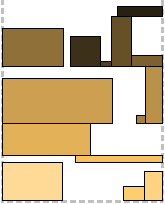
Хитрая модификация Next Fit Level. Уровни создаются по два, на каждом из которых своя стратегия.
Нижний уровень (или все нечетные): первый пришедший прямоугольник упаковывается по левому краю, остальные — справа налево, пока достаточно места. Затем уровень закрывается и его высота определяется по самому высокому прямоугольнику в нем.
Верхний уровень (или все четные): если на нижнем уровне всего один прямоугольник, уровень упаковывается аналогично нижнему. Если два и больше, то первый прямоугольник упаковывается над более низким из двух прижатых к краям полосы, и также прижимается к краю полосы; все последующие упаковываются справа налево, независимо от того, где был упакован первый — слева или справа.
Звучит путано и не сразу понятно, к чему такие танцы с бубном. Единственное, что очевидно обеспечивает этот алгоритм — это более равномерное распределение прямоугольников по объему полосы, без перекоса к левому краю. Но мы еще вернемся к этой стратегии, когда будем рассматривать алгоритмы компрессии.
Алгоритм BiNFL
Bi-Level Next Fit
Input: The dimensions of the rectangles {w(Li); h(Li)} and the strip width W.
Output: The height H and the entire packing.
 1: level = 1; h(level) = 0; H = 0; i = 1
 2: open a new bi-level
 3: call 'pack on lower level'
 4: print H and entire packing
Procedure 'pack on lower level'
 1: the first rectangle packed is left justified
 2: subsequent rectangles that fit are right justified
 3: if there is insufficient space then
 4:    h(level) is given by the height of tallest rectangle packed
 5:    call 'pack on upper level'
 6: end if
Procedure 'pack on the upper level'
 1: if Li+1 is the first rectangle packed then
 2:    left justify on top of Li
 3: else
 4:    if Li+2 is the first rectangle packed then
 5:       pack above min {h(Li); h(Li+1)}
 6:       justify according to min {h(Li); h(Li+1)}
 7:   else
 8:      if Li+j (j > 3) fits on the upper level then
 9:         left justify all other rectangles
10:      else [rectangle does not fit]
11:         H += h(lower) + h(upper); open new bi-level
12:      end if
13:    end if
14: end if
Shelf algorithms
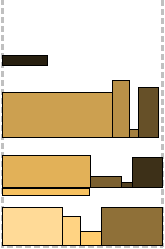

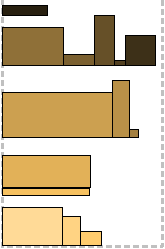
Шельфовые алгоритмы не привязываются к точной высоте прямоугольников и после упаковки первого на уровне (шельфе) остается немного места на случай если следующий будет немного выше. Это «немного» регулируется параметром r ∈ (0;1). Высота шельфа определяется как rk, где rk+1 < h(Li) ≤ rk для некоторого целого k и высоты первого упаковываемого прямоугольника h(Li). Аналогично уровневым алгоритмам, применяются стратегии обхода шельфов Next Fit, First Fit и Best Fit. Оставленный на каждом шельфе «резерв» становится выгодным в двух последних случаях (сравните FFL и FFS, BFL и BFS). В примере p=0,7.
Алгоритмы NFS, FFS, BFS
Next Fit Shelf
Input: The dimensions of the rectangles {w(Li); h(Li)}
       the parameter r and the strip width W.
Output: The height H and the entire packing.
 1: shelf = 1; w(shelf) = 0;
    h(shelf) = r^k for some integer k; i = 0; H = h(shelf)
 2: while there is an unpacked rectangle do
 3:    i++; compute k
 4:    if there is sufficient space and r^(k+1) < h(Li) ≤ r^k then
 5:       pack rectangle to the right of the previously packed rectangle
 6:    else [there is insufficient space]
 7:       create a new shelf on top of the previous one
          and pack rectangle Li on the new shelf.
 8:       shelf++; H += r^k
 9:    end if
10: end while
11: print H and entire packing.
First Fit Shelf
Input: The dimensions of the rectangles {w(Li); h(Li)}
       the parameter r and the strip width W.
Output: The height H and the entire packing.
 1: shelf = 1; h(shelf) = r^k for some integer k;
    i = 0; H = h(shelf); shelfnum = 1
 2: while there is an unpacked rectangle do
 3:    i++; compute k
 4:    search for lowest shelf of appropriate height with sufficient space
 5:    if such a shelf exists then
 6:       pack rectangle to the right of the previously packed rectangle
 7:    else [there is insufficient space in all shelves of
             appropriate height or such a shelf does not exist]
 8:       create a new shelf above the top-most shelf
          and pack rectangle Li on the new shelf.
 9:       shelf++; H += r^k; shelfnum++
10:    end if
11: end while
12: print H and entire packing.
Best Fit Shelf
Input: The dimensions of the rectangles {w(Li); h(Li)}
       the parameter r and the strip width W.
Output: The height H and the entire packing.
 1: shelf = 1; h(shelf) = r^k for some integer k;
    i = 0; H = h(shelf); shelfnum = 1
 2: while there is an unpacked rectangle do
 3:    i++; compute k
 4:    search all shelves (starting with the bottom) for one
       with appropriate height and has minimum residual horizontal space.
 5:    if such a shelf exists then
 6:       pack rectangle to the right of the previously packed rectangle
 7:    else [there is insufficient space or
             there is no shelf of appropriate height]
 8:       create a new shelf above the top-most shelf
          and pack the rectangle Li on the new shelf.
 9:       shelf++; H += r^k; shelfnum++
10:    end if
11: end while
12: print H and entire packing.
Harmonic Shelf
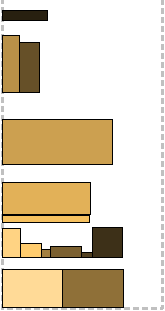
Harmonic Shelf пакует на один уровень прямоугольники не только со схожей высотой, но и со схожей шириной. В результате получится больше уровней, но заполнены они будут плотнее. Вводится дополнительный параметр M для расчета допустимой ширины.
Общая ширина полосы, для простоты возьмем ее за единицу, делится на M интервалов I1..IM. Автор утверждает, что разумное значение M находится в [3; 12]. Ширина интервалов рассчитывается по формуле:
 ;
; 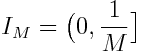
Для каждого прямоугольника рассчитывается значение p. Параметр k для высоты рассчитывается аналогично шельфовым алгоритмам. Проверяются два условия: есть ли для прямоугольника место на каком-нибудь шельфе высотой rk и соответствует ли его p уже упакованным там. Если хотя бы одно не выполнено, для него создается свой шельф, с блекджеком и максимально комфортными условиями. В примере p=0,7, M=4.
Алгоритм HS
Harmonic Shelf
Input: The dimensions of the rectangles {w(Li); h(Li)}
       the parameters M, r and the strip width W.
Output: The height H and the entire packing.
 1: shelf = 1; h(shelf) = r^k for some integer k; i = 0
 2: while there is an unpacked rectangle do
 3:    i++; compute k such that r^(k+1) < h(Li) ≤ r^k
 4:    compute the value of p such that 1/(p+1) < w(Li) ≤ 1/p
       where 1 ≤ p < M
 5:    amongst shelves of height r^k find the one
       with packing rectangles whose width fits in the interval Ip
 6:    if there is insufficient space or no rectangle of height r^k then
 7:       a new shelf of appropriate height is created above the top-most shelf
 8:       shelf++
 9:    end if
10:    if rectangle Li is the first on the shelf then
11:       h(shelf) = r^k; H += h(shelf)
12:    end if
13: end while
14: print H and entire packingAzarY
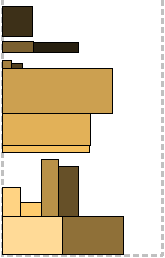
Для деления на уровни вводится некое пороговое значение 0 < Y < 1/2. Ширина прямоугольников масштабируется в соответствии с шириной полосы, которая принимается за единицу. Прямоугольники высотой 2j-1 < h(Li) ≤ 2j и шириной 2-x-1 < h(Li) ≤ 2-x упаковываются на один уровень. То есть уровень характеризуется парой (x, j) для некоторого целого j и натурального x.
Прямоугольники шириной не менее Y нарекаются буферными и пакуются каждый на отдельный уровень. То есть если попался такой прямоугольник, нужно срочно открывать новый уровень, высотой равный ему. Все остальные (не-буферные) пакуются на первый подходящий уровень. Подходящий — в смысле с такой же парой (x, j). Если вдруг места не хватило, не-буферный прямоугольник может стать первым в новом уровне, тогда высота этого уровня будет 2j.
Какая-то нездоровая иерархия, в общем.
В примере Y=0,4.
Алгоритм Azar
AzarY
Input: The dimensions of the rectangles {w(Li); h(Li)}
       the parameter Y and the strip width W.
Output: The height H and the entire packing.
 1: h(level) = 0; w(level) = 0; level = 0
 2: while there is an unpacked rectangle do
 3:    if w(Li) ≥ Y then
 4:       level++; w(level) = w(Li); h(level) = h(Li); H += h(level)
 5:    else [w(Li) < Y ]
 6:       compute x and j such that
          2^(j-1) < h(Li) ≤ 2^j and 2^(-x-1) < w(Li) ≤ 2^(-x)
 7:       search for the lowest (x, j) level
 8:       if no (x, j) level is available or Li is blocked then
 9:          level++; h(level) = 2^j; H += h(level)
10:          w(level) += w(Li)
11:       else [(x, j) level is available and not blocked]
12:          w(level) += w(Li)
13:       end if
14:    end if
15: end while
16: print H and entire packing
Compression algorithms
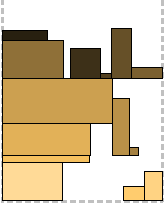
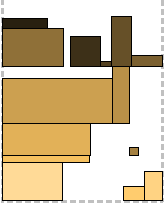
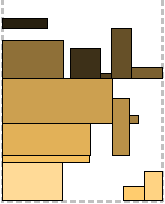
Компрессионные алгоритмы основаны на BiNFL и по сути представляют собой патчи к методу упаковки верхнего уровня.
Общее отличие — верхний уровень всегда упаковывается слева направо.
Compression Part Fit: Для каждого прямоугольника, упакованного на верхний уровень, проверяется, есть ли под ним место на нижнем уровне. Если можно сдвинуть его на нижний уровень так, что часть его останется на верхнем, он сдвигается (отсюда Part Fit — он частично может быть «вжат» в предыдущий уровень). Таким образом можно снизить общую высоту второго уровня. Больше на упаковку он никак кардинально не влияет. На первом рисунке видно прямоугольник, висящий между уровней — он и был сдвинут.
Compression Full Fit: Для каждого прямоугольника, упакованного на верхний уровень, проверяется, может ли он полностью сместиться вниз на предыдущий уровень. Собственно, если может, то и смещается. Это дает нам стратегическое преимущество: освободившееся таким образом место на уровне может быть использовано для следующего прямоугольника. К сожалению, второй рисунок не содержит такую ситуацию, но зато на нем можно увидеть двоих провалившихся.
Compression Combo: Да-да, это комбинация двух предыдущих и, соответственно, комбинация их плюсов. Третий рисунок иллюстрирует.
Алгоритмы CPF, CFF, CC
Compression
Input: The dimensions of the rectangles {w(Li); h(Li)} and the strip width W.
Output: The height H and the entire packing.
 1: i = 0; H = 0
 2: open new bi-level
 3: packing on lower level is similar to BiNFL; H += h(lowerlevel)
 4: if there is insufficient space to pack a rectangle on the lower level then
 5:    call 'pack on the upper level'
 6: end if
 7: print H and entire packing
Procedure 'pack on the upper level'
 1: while there is an unpacked rectangle do
 2:    if i ≥ 3 and Li is the first rectangle packed then
 3:       justify according to the shorter
          of the left-most and right-most rectangles
 4:       slide rectangle downwards if there is sufficient space
          and go to 12
 5:    else
 6:       if i ≥ 3 and Li is the second rectangle packed then
 7:          right justify and go to 12
 8:       else [rectangle does not fit]
 9:          H += h(upperlevel); open new bi-level
10:       end if
11:    end if
12: end while
Compression Part Fit
Input: The dimensions of the rectangles {w(Li); h(Li)} and the strip width W.
Output: The height H and the entire packing.
 1: i = 0; H = 0
 2: open a new bi-level
 3: packing on lower level is similar to BiNFL; H += h(lowerlevel)
 4: if there is insufficient space to pack a rectangle on the lower level then
 5:    call 'pack on the upper level'
 6: end if
 7: print H and entire packing
Procedure 'pack on the upper level'
 1: while there is an unpacked rectangle do
 2:    if h(Li) > VerticalSpace and w(Li) ≤ HorizontalSpace then
 3:       shift rectangle Li downwards; go to 11
 4:    else
 5:       if h(Li) ≤ VerticalSpace and W - w(level) ≥ w(Li) then
 6:          left justify; go to 11
 7:       else [rectangle does not fit]
 8:          H += h(upperlevel); open a new bi-level
 9:       end if
10:    end if
11: end while
Compression Full Fit
Input: The dimensions of the rectangles {w(Li); h(Li)} and the strip width W.
Output: The height H and the entire packing.
 1: i = 0; H = 0
 2: open a new bi-level
 3: packing on lower level is similar to BiNFL; H += h(lowerlevel)
 4: if there is insufficient space to pack a rectangle on the lower level then
 5:    call 'pack on the upper level'
 6: end if
 7: print H and entire packing
Procedure 'pack on the upper level'
 1: while there is an unpacked rectangle do
 2:    if h(Li) ≤ VerticalSpace and w(Li) ≤ HorizontalSpace then
 3:       slide rectangle Li downwards; go to 11
 4:    else
 5:       if h(Li) ≤ VerticalSpace and W - w(level) ≥ w(Li) then
 6:          left justify; go to 11
 7:       else [rectangle does not fit]
 8:          H += h(upperlevel); open new bi-level
 9:       end if
10:    end if
11: end while
Compression Combo
Input: The dimensions of the rectangles {w(Li); h(Li)} and the strip width W.
Output: The height H and the entire packing.
 1: i = 0; H = 0
 2: open a new bi-level
 3: packing on lower level is similar to BiNFL; H += h(lowerlevel)
 4: if there is insufficient space to pack a rectangle on the lower level then
 5:    call 'pack on the upper level'
 6: end if
 7: print H and entire packing
Procedure 'pack on the upper level'
 1: while there is an unpacked rectangle do
 2:    if w(Li) ≤ HorizontalSpace then
 3:       slide rectangle Li downwards; go to 11
 4:    else
 5:       if w(Li) > HorizontalSpace and W - w(level) ≥ w(Li) then
 6:          left justify, go to 11
 7:       else [rectangle does not fit]
 8:          H += h(upperlevel); open new bi-level
 9:       end if
10:    end if
11: end while
Online fit
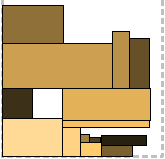
Более трудоемкий метод, чем предыдущие, но и более производительный. Основан на алгоритме Burke для оффлайн-варианта задачи. Некоторые аспекты я, пожалуй, нарисую.
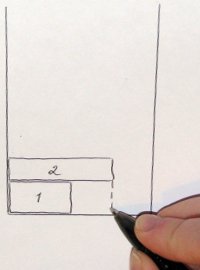

В процессе упаковки могут образовываться пустые области (Empty Areas), которые алгоритм будет пытаться заполнить в первую очередь. Как они могут образоваться, видно на фото слева. Заметим, что для этого нужно хранить некое представление заполненности полосы.
После заполнения из пустой области может получиться две (а может и не получиться, you know).
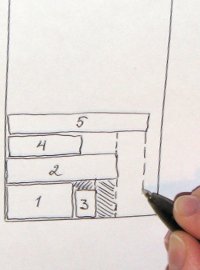
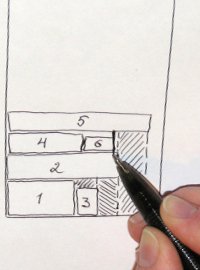 Также одним шагом упаковки могут быть созданы сразу несколько областей — пространство под прямоугольником анализируется по вертикали и делится по количеству «ступенек». На среднем фото еще раз показано разбиение пустой области на две после упаковки туда прямоугольника (кстати, мне кажется, в этом месте оптимальнее было бы разбить ее по горизонтали).
В общем, чем дальше в лес, тем больше пустот. На каждом шаге пристально рассматриваются стремительно мельчающие пустоты. Здесь мне видится еще одна оптимизация: можно ввести меру целесообразной площади и отбрасывать неугодные.
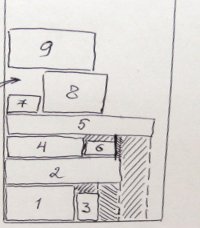 Если ни одна пустая область не подходит, упаковка продолжается методом Burke. Я напомню. Строится карта высот для полосы, и прямоугольник примеривается в самую низкую на данный момент область. Если он туда не входит, низкое место «заполняется» до уровня ближайшей ступеньки, и поиск повторяется. Так потенциальное место может быть вытолкнуто на самый верх, и тогда возникает еще один вариант образования пустого пространства (см. справа).
Та же карта высот используется на каждом шаге для выявления пустых областей.
В общем-то, все уже сказано. Сперва пытаемся упаковать по пустым областям, затем в наиболее низкое место, и в последнюю очередь — сверху, вырожденный случай «самого низкого места».
Алгоритм OF
Online Fit
Input: The dimensions of the rectangles {w(Li); h(Li)} and the strip width W.
Output: The height H and the entire packing.
 1: i = 0; H = 0
 2: Create a linear array whose number of elements are equal to W
 3: while there is an unpacked rectangle do
 4:    i++
 5:    Search the list of empty areas for sufficient space to pack Li
 6:    if w(EmptyArea) ≥ w(Li) and h(EmptyArea) ≥ h(Li) then
 7:       pack rectangle in empty area
 8:    else
 9:       if rectangle does not fit in any of the empty areas then
10:          search the linear array for available packing width
11:       else [there is insufficient space in linear array]
12:          pack rectangle on top left justified
             from the index leading to smaller space
13:       end if
14:    end if
15: end while
16: H = highest entry in the linear array
17: print H and entire packing
Послесловие
Чтобы развеять ощущение бесцельности происходящего, приведу один из классических, но вдохновляющих примеров применения алгоритмов двумерной упаковки в полуограниченную полосу. Это планировщик задач для многопроцессорной системы. В современном софте для кластеров используются более «взрослые» алгоритмы, но сама задача планирования сводится к 2DSP. В условиях работы кластеров поток поступающих задач представляет собой не что иное, как online данные для упаковки: размерность по горизонтали — требуемое количество ядер, по вертикали — время работы задачи. (Все как на заре технологий: встаешь в очередь к компьютеру и заранее предупреждаешь, сколько тебе нужно ресурсов и как долго будет крутиться твоя перфокарта). Планировщик должен выделить для задачи конкретные процессоры и определить момент запуска. В чистом виде, кстати, ни один алгоритм использовать нельзя, так как время капает, пока планировщик ждет задачу или думает над ее размещением. Дополнительно программисту могут связывать руки разные специфические условия: приоритет задач; возможность масштабирования задачи во время выполнения; хардварные задержки и самообслуживание системы, в том числе перераспределение с учетом отказавших ресурсов; сопоставление характера коммуникаций внутри задачи с архитектурой кластера, etc.
Любой алгоритм прекрасен в своей математической строгости, пока не начнешь прикладывать его к реальной жизни.
И напоследок — сравнительная характеристика алгоритмов в приятном обезличенном виде. Здесь приведено отношение оптимальной высоты упаковки (сумма площадей прямоугольников, деленная на ширину полосы) к полученной.
| NFL | FFL | BFL | BiNFL | NFS | FFS | BFS | HS | AzarY | CPF | CFF | CC | OF |
|---|---|---|---|---|---|---|---|---|---|---|---|---|
| 0,56 | 0,63 | 0,75 | 0,56 | 0,45 | 0,57 | 0,57 | 0,37 | 0,44 | 0,60 | 0,59 | 0,63 | 0,72 |
Код (Qt):
Алгоритмы packager.h packager.cpp
Гуй window.h window.cpp renderarea.h renderarea.cpp main.cpp
Для просмотра полной версии этой страницы, пожалуйста, пройдите по ссылке.